
Getting started
This walks through running CertPilot from source and issuing a certificate — first from the self-signed gateway, then from a real ACME CA. It is the page you want when you are changing CertPilot.
Deciding whether CertPilot is interesting? Start with Evaluate CertPilot instead. It is one container stack, no toolchain and no database to provision, measured at about twenty seconds to a console — and it goes all the way through issuing, renewing and cleaning up. This page assumes you want Go, Node and PostgreSQL on your machine.
Background
Since March 2026, a public TLS certificate may be valid for a maximum of 200 days. This falls to 100 days in March 2027 and 47 days in March 2029, under the schedule adopted by the CA/Browser Forum in ballot SC-081v3. Domain validation reuse periods are reduced to 10 days over the same period.
At a 47-day maximum, each certificate requires renewal approximately eight times per year. Manual processes — a calendar reminder, a documented procedure, or an individual responsible for tracking expiry — do not scale to that frequency. The remainder of this page covers installing and evaluating CertPilot.
See the README for what is and is not built. In short: the core, the gateway architecture, ACME and Vault issuance, revocation, deployment, the host agent, discovery and posture reporting all work end to end.
Prerequisites
- Go 1.26+
- Node.js 20+ (frontend only)
- PostgreSQL 13+ (
brew install postgresql@17)
The .proto contract lives in certpilot-gateway-sdk now, so buf is only a prerequisite there.
No cloud account is needed. If you skip PostgreSQL entirely the core still starts, on an in-memory store seeded with sample data that is discarded on exit — fine for a first look, useless for anything you want to still be there tomorrow.
The short version
make devThat is the whole thing: it starts PostgreSQL if it is not already running, creates a certpilot_dev database, applies every migration, generates a development key encryption key once and reuses it, starts the self-signed gateway, the API, and the frontend, and registers the gateway as a CA account so there is something to issue from.
The gateway is fetched from its own release rather than built from this tree, so the first run downloads it. Nothing else about make dev changed when the gateways moved out.
Open http://localhost:3000. Ctrl-C stops everything, and stops PostgreSQL too if it was not already running when you started.
The database survives restarts, and so does the key encryption key — it is written to .certpilot/dev-kek and reused, because generating a fresh one would make every private key already stored permanently unreadable.
To use a database of your own, export CERTPILOT_DB_URL before running; the bootstrap above is skipped entirely. Every migration applies to a stock PostgreSQL server, so there is nothing to prepare first — there used to be a prelude here, creating objects migration 001 borrowed from a hosted platform, and removing it is what made pointing at a database you brought yourself possible.
The rest of this page is the same thing done by hand, which is what you want when you are changing one piece of it.
1. Generate development keys
Two things need key material before anything starts.
make dev-certsThis writes mutual-TLS material into .certpilot/pki/ — a throwaway CA, a gateway certificate, and a core certificate. The core-to-gateway channel carries certificate signing requests, private keys, and CA credentials, so it is authenticated in both directions by default.
export CERTPILOT_KEK=$(make -s generate-kek | cut -d= -f2-)The key encryption key seals certificate private keys and CA credentials before they reach the database. Against a real database the core refuses to start without one; with the in-memory store it will generate an ephemeral key and warn. (make dev handles this for you and keeps the key in .certpilot/dev-kek.)
.certpilot/is gitignored. Never commit it: it contains CA and ACME account private keys.
2. Configure
cp config.example.yaml config.dev.yamlThe defaults are set up for local development: bound to loopback, one explicit CORS origin, mTLS pointed at .certpilot/pki/. Production mode refuses three things that are convenient locally — plugins.tls.insecure, a * in server.allowed_origins, and running with no database at all — by refusing to start, so a development config cannot quietly become a production one.
What it does not do is enable anonymous access, because no configuration can. auth.allow_anonymous is refused in every mode, not just production: the core will not start with it set. You sign in locally exactly as you would anywhere else, which is what the next section starts with.
3. Run
Each of these wants its own terminal.
make run-gateway-selfsigned # :9091make run-core # :8080make run-frontend # :3000The dashboard is at http://localhost:3000. /ca-health lists every CA by urgency, and /display is the fullscreen wall view. All three need you signed in, locally as much as anywhere else; /display also accepts a display token, which is the credential to give a screen in a corridor that nobody is sitting at. See the API reference.
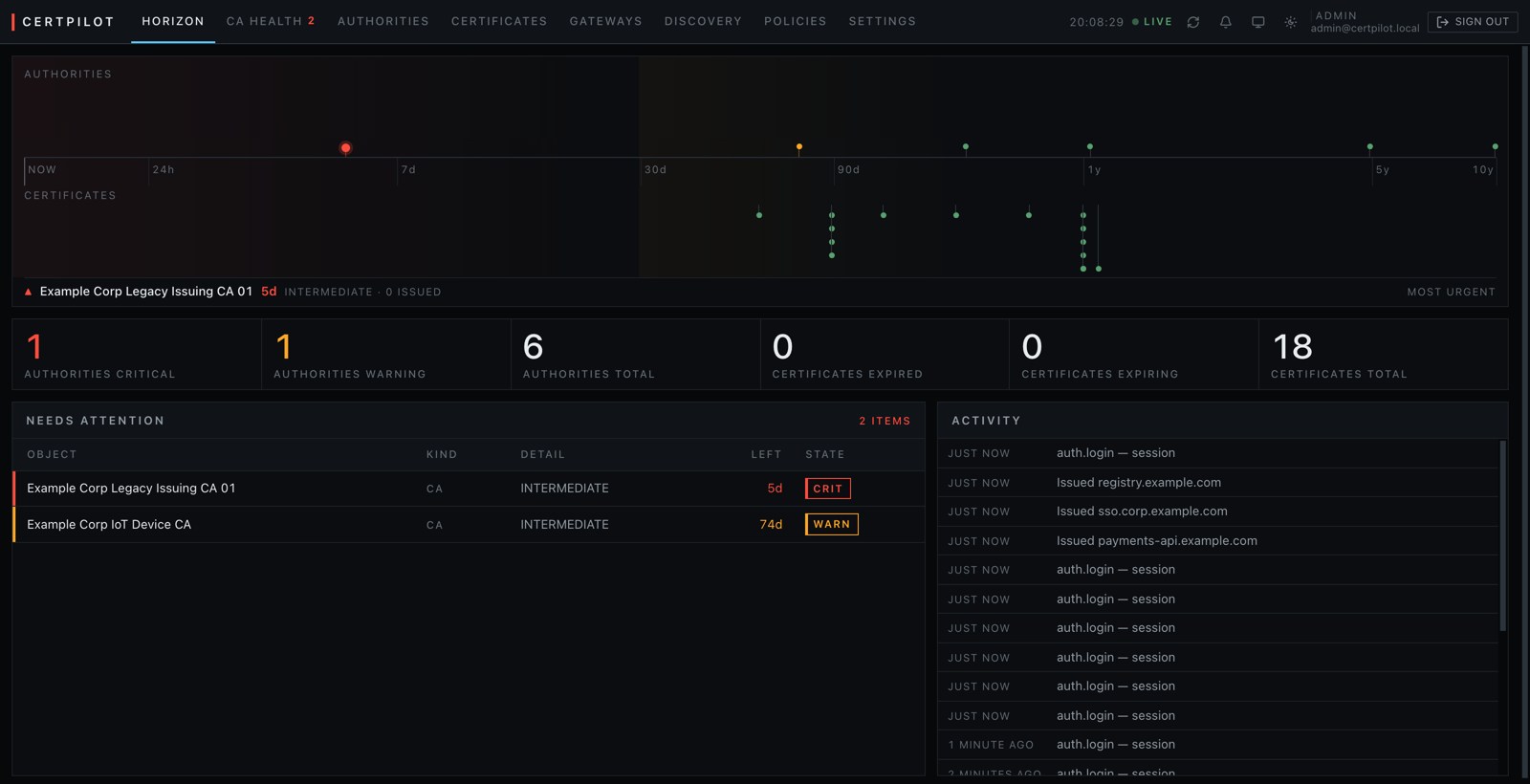
The horizon is logarithmic, so "five days" and "five years" fit on one axis without the near end collapsing to a point. The red marker is an intermediate CA five days out; everything it ever signed stops verifying when it goes.
Sign in
The core creates an administrator on first start and prints the password once. make dev also writes it to .certpilot/dev-admin. Sign in and keep the session in a cookie jar, which the rest of this page uses:
JAR=$(mktemp)
curl -sS -c "$JAR" -X POST localhost:8080/api/v1/auth/login \
  -H 'Content-Type: application/json' \
  -d '{"email": "you@example.com", "password": "..."}'
Or let the helper the development scripts use do it:
source scripts/dev-session.sh
JAR=$(dev_session http://localhost:8080 .certpilot)
There is no anonymous mode, so a command without -b "$JAR" is a 401 — including every command below. If you have an identity provider configured, -H "Authorization: Bearer $TOKEN" works anywhere -b "$JAR" does.
Confirm the gateway registered over mTLS:
curl -s -b "$JAR" localhost:8080/api/v1/gateways | jq '.data[] | {name, is_connected}'4. Issue a certificate
Register the gateway as a CA account. The core connects, asks the gateway to validate the configuration, and only then seals and stores it:
curl -s -b "$JAR" -X POST localhost:8080/api/v1/ca-accounts \
  -H 'Content-Type: application/json' -d '{
    "name": "selfsigned-dev",
    "provider_type": "selfsigned",
    "gateway_addr": "localhost:9091",
    "server_name": "localhost",
    "config": {"validity_days": 90}
  }' | jq
Then request a certificate, using the returned account id:
curl -s -b "$JAR" -X POST localhost:8080/api/v1/certificates \
  -H 'Content-Type: application/json' -d '{
    "common_name": "test.example.local",
    "sans": ["www.test.example.local"],
    "ca_account_id": "<id>",
    "key_type": "ECDSA",
    "key_size": 256,
    "auto_renew": true
  }' | jq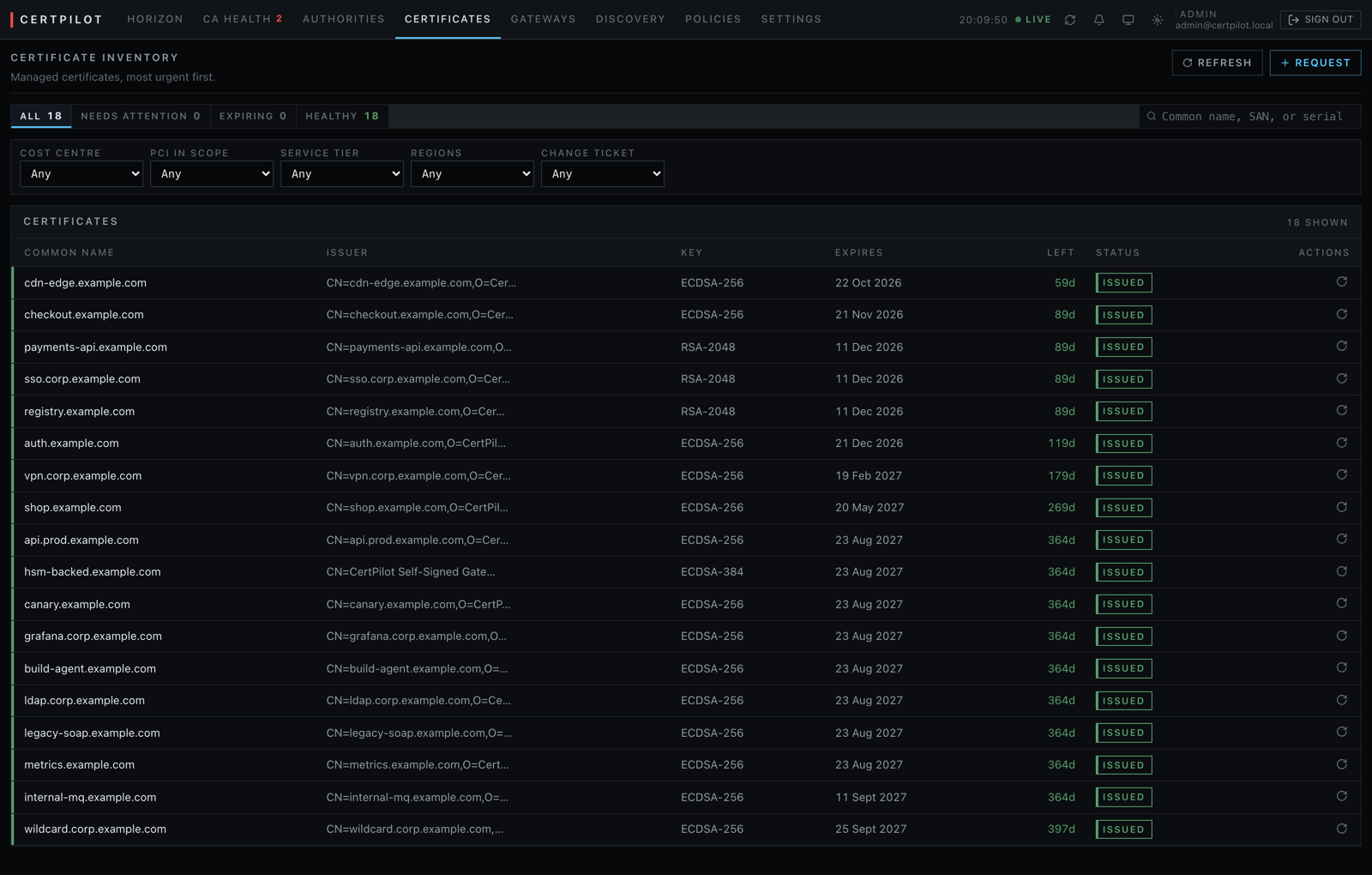
The filters above the table are not built in. They are the custom metadata fields this instance defined, and "PCI in scope" is marked required — which is why issuing a certificate without it is refused rather than recorded as unknown.
The response contains the certificate but not the private key. Keys are never included in list or detail responses; exporting one is a separate admin-only call that writes an audit record:
curl -s -b "$JAR" localhost:8080/api/v1/certificates/<id>/private-key | jq -r .private_key_pem5. Issue from a real CA
Start the ACME gateway against Let's Encrypt staging:
make run-gateway-acme # :9092ACME needs to prove you control the domain. Pick a challenge:
dns-01 (required for wildcards)
Cloudflare — the token needs Zone:Read and DNS:Edit:
curl -s -b "$JAR" -X POST localhost:8080/api/v1/ca-accounts \
  -H 'Content-Type: application/json' -d '{
    "name": "letsencrypt-staging",
    "provider_type": "acme",
    "gateway_addr": "localhost:9092",
    "server_name": "localhost",
    "config": {
      "directory_url": "letsencrypt-staging",
      "email": "you@example.com",
      "challenge": "dns-01",
      "dns_provider": "cloudflare",
      "dns_config": {"api_token": "YOUR_TOKEN"}
    }
  }' | jq
For any other DNS provider, use the webhook solver and write a small receiver — see dns-01 solvers below.
http-01
The CA fetches http://<domain>/.well-known/acme-challenge/<token> on port 80. Either let the gateway bind port 80, or run it on a high port and have your existing reverse proxy forward that path to it:
{
  "directory_url": "letsencrypt-staging",
  "email": "you@example.com",
  "challenge": "http-01",
  "http01_bind_addr": "127.0.0.1:5002"
}
The gateway validates whichever configuration you supply before storing it, so a wrong token or an unreachable directory is reported immediately rather than during a renewal months later.
Move to production by changing directory_url to letsencrypt. Do that only once staging works — Let's Encrypt production rate limits are strict and recovering from hitting them takes a week.
dns-01 solvers
| Provider | dns_provider | Required dns_config |
|---|---|---|
| Cloudflare | cloudflare | api_token |
| Anything else | webhook | url, plus bearer_token and/or signing_secret |
The webhook solver exists so CertPilot does not have to implement a solver for every DNS provider that will ever matter. It POSTs to an endpoint you control:
{
  "action": "present",
  "type": "dns-01",
  "domain": "example.com",
  "fqdn": "_acme-challenge.example.com",
  "value": "the TXT record contents",
  "token": "acme-challenge-token"
}
action is present or cleanup. When signing_secret is set, the request carries X-CertPilot-Signature: the hex HMAC-SHA256 of the raw body. Verify it before touching a zone. Respond 2xx on success; a non-2xx body is surfaced to the operator, so put the actual reason in it.
Your receiver must tolerate two present calls for the same FQDN with different values — an order covering both example.com and *.example.com produces exactly that, and both TXT records have to coexist.
Using PostgreSQL
export CERTPILOT_DB_URL="postgresql://user:pass@localhost:5432/certpilot"
make run-core
Apply migrations in order from migrations/. One caveat:
- With a database configured,
CERTPILOT_KEKis mandatory. Losing it makes every stored private key and CA credential unrecoverable, so put it in a secret manager, not a shell profile.
Authentication
Everything requires a sign-in, including local development. On first start, CertPilot creates the account named in auth.bootstrap_admins, generates a password, and prints it once:
┌─ CertPilot: first run ──────────────────────────
│   email:    you@example.com
│   password: cbYF5-RMeJd-q446h-9DG9Y
└─────────────────────────────────────────────────
make dev also writes it to .certpilot/dev-admin. There is no default password and no anonymous mode.
For anything else, point auth.jwks_url at your identity provider. CI runs this against Keycloak; Okta, Entra ID, Auth0 and Authentik speak the same standard but have not been tested by this project. The core then verifies asymmetrically signed tokens against published public keys and holds nothing capable of minting one.
Roles are read from app_metadata.certpilot_role in the token, and only from there — user_metadata is writable by the user it belongs to, so trusting it would let any account promote itself.
| Role | Can do |
|---|---|
admin | Everything, including deleting records and exporting private keys |
operator | Issue, renew, and revoke certificates; manage CAs and policies |
auditor | Read-only, including audit logs |
viewer | Read-only |
Troubleshooting
invalid TLS configuration — run make dev-certs, or pass --insecure to a gateway for local work without TLS.
could not connect to the gateway — the gateway process is not running, or its certificate does not name the host you dialed. Set server_name on the CA account when connecting by IP or through a service alias.
CERTPILOT_KEK is not set — expected with a database configured. Run make generate-kek.
the gateway rejected this configuration — the response lists exactly what is wrong. This is the gateway's ValidateConfig doing its job before a bad credential becomes a failed renewal.
ACME no usable challenge — the CA does not offer the challenge type you configured. Wildcards require dns-01.
Next
Once this works, the things worth doing next:
| Issue from your own Vault | gateways/vault.md |
| Put a certificate on a server automatically | deployment.md |
| Run the agent, so keys never leave the host | agent.md |
| Find certificates nobody told you about | discovery.md |
| Put it on a wall display | monitoring.md |
| Run it for real | operations.md |
docs/README.md is the full index. When something goes wrong, troubleshooting.md is organised by symptom.
Running against PostgreSQL
CertPilot stores everything in a PostgreSQL database you run. Point it at one and apply the schema:
export CERTPILOT_DB_URL='postgres://certpilot:<pw>@<host>:5432/certpilot?sslmode=require'
certpilot-core --migrate
Every migration applies to a stock PostgreSQL 14 or later — no extensions, no prelude, no platform-specific objects. The schema carries no row-level security; authorisation for people is enforced in the API layer. CertPilot's own connection should own these tables.
This path is exercised by make test-store, which migrates a throwaway database from the repository's own migration files on every run.